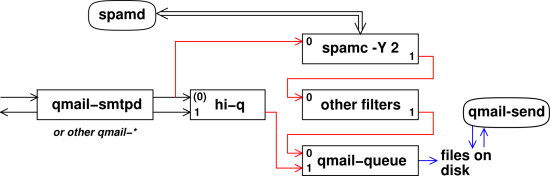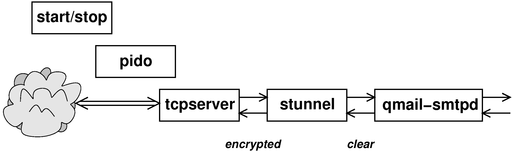
Figure 1: Early Stages of Processing
Copyright © 2007 jsd
There are lots of bad ways to install qmail, but rather fewer good ways.
In order to install qmail properly, you will need at least the following:
In the top-level qmail directory, perform the make and make setup check steps. The basic make does not require superuser privileges, but the make setup does.
Installation involves the usual make and make setup check steps. Once again, the basic make does not require superuser privileges, but the make setup does.
Slightly more detailed instructions are at http://cr.yp.to/ucspi-tcp/install.html
When you "make install" stunnel, it will try to create a .pem file for you (if you don’t already have one), which may not be what you want right now. It may be simpler to "touch /usr/local/etc/stunnel/stunnel.pem" and then replace it later.
It is possible to run spamassassin while the mail is still coming in, i.e. while the SMTP connection is still open. That means that if the message is too spammy, we can reject it and return an SMTP error code along with a brief explanation.
Many people (including reference 3) have argued that "discarding all spam" causes problems. Well, that’s true, if you discard "all" spam. On the other hand, discarding some spam during the SMTP transactions solves far more problems than it causes.
Here are some of the considerations:
Some folks unwisely assume that we must either accept all spam or discard all spam. This is a false dichotomy.
Things work much better if we make a three-way choice, using Green/Yellow/Red filtering. In particular, suppose the SA threshold is set a 5, thereby defining the bottom of the yellow zone. Also suppose we give spamc the "-Y 2" option, thereby defining the bottom of the red zone. Then
Note that there are very few emails with scores in the range between 5 and 7. Almost all legit emails have a score of less than 5, and almost all spams have a score of 7 or more. That means that the burden on the end user of seeing all the messages in this range is small. The burden is especially small since the messages arrive already marked as probably spam.
One might argue that from a public relations point of view, it is good to let a few marginal emails slip through, so that users know that the spam filter system is working.
Here is the ./spamc-zap.patch patch to make -Y work.
It is trickier than you might think to get a fully satisfactory copy of the “basic” qmail package, and that’s even before worrying about security (section 5) and other practical issues (section 6).
By far the easiest thing to do is to use git to fetch the latest and greatest copy, for example:
  cd /usr/src/          # or wherever
  git clone http://www.av8n.com/cgit/cgit.cgi/qmail/
One nice thing about git is that when you do that, you can see what you’ve got, because not only do you have the latest version, you also have all previous versions at your fingertips. That makes it easy to compare versions.
At this point you have a chance of reading the instructions and then getting to the basic qmail functions to work. Start by reading the six INSTALL.* files that come with the distribution.
The seventh INSTALL* file is plain INSTALL with no "dot anything" in the name. It is simply a pointer to reference 1. That is a standard tutorial ... but I suggest you do not start there. I do not endorse everything they say there. In particular their approach to anti-spam seems awkward, unsystematic, and uninspired, to say the least. My recommendations are:
I agree with reference 2 that a simple start/stop script is preferable to messing with daemontools; it is simpler and more compatible with the way typical linux systems manage their daemons.
I find that integrating spamassassin as described in section 2 and section 6 gives a much better result with much less effort.
Note that if you follow the instructions in section 3.1, you can skip this section entirely. Mostly this section serves as historical notes as to what went into building the latest & greatest version mentioned in section 3.1.
You could start by getting the netqmail package from http://www.qmail.org/qmail-1.03.tar.gz ... see http://www.qmail.org/ for an overview. Netqmail is basically the old qmail package with a couple dozen patches. There is wide consensus that these patches are somewhere between desirable and mandatory.
Note that many people use the qmail name to refer to netqmail (or any other patched version of qmail).
If you want to work even harder, you could get the old “original qmail” package from http://www.qmail.org/qmail-1.03.tar.gz and apply the two dozen patches needed to bring it up to equivalence with netqmail.
On top of netqmail, you’re going to need the big AUTH patch as described at http://tomclegg.net/qmail/ . You can download it from http://members.elysium.pl/brush/qmail-smtpd-auth/ or from http://tomclegg.net/qmail/qmail-smtpd-auth-0.31.tar.gz .
And then there is a patch to that patch: http://tomclegg.net/qmail/qmail-smtpd-auth-close3.patch .
Even more important is the hefty STARTTLS patch, from http://inoa.net/qmail-tls/.
On top of that, there are about a dozen more patches at http://megaz.arbuz.com/2002/12/20/qmail-howto/. I only included about half of them. Some of them looked particularly tasty because they were things that qmail-smtpd could do efficiently, and did not duplicate the work of spamassassin.
I also made a bunch of changes at the syntactic level (without changing the meaning at all) in order to make the thing compile without warning on a wider variety of machines. Little things like “int main” instead of “void main” and renaming to avoid conflicts with widely-used built-in functions.
Here is the next level of detail on what the patches entail. This is what you would get if you did the git-pull as described in section 3.1 and then did a git-log:
commit 91c3cef2dabfb3b8cb48802a1e8cef36c3a452b8

    Minor bugfix.  If you use morercpthosts, after a failed authentication
    attempt, if the client attempts to send mail to a domain which is not
    listed in rcpthosts, qmail-smtpd is unable to read morercpthosts.cdb.
    Instead, it sends "421 unable to read controls (#4.3.0)" and drops the
    connection.  This patch fixes this bug by closing file descriptor 3
    (only if necessary) in the authentication child process rather than
    the parent process.
    Credit: Tom Clegg

commit aa885d7e8916162aa8b6b60a1003e0b91dbdd4c2

    Change some names and tidy up, for portability.

commit 56f874d0c574cc7e5842db22728c435151b90d8a

    qmail.c : more explicit SMTP error when email is rejected by spam filter
    plus some comments

commit 05b5bbd10fbaff9ca1eb834e3ff6ac37b0db1d83

    qmail.c : log status when TERM signal received

commit a13a0f444f9fdd8c6c2d96459b7b05f134dbd009

    qmail-start now does a setpgrp.
    This is to facilitate killing qmail-send *and* all
    its children, as a group.

commit a5147ab04fa4b8095ca69c9483f8328b6e00bbff

    Reject emails addressed to multiple recipients with a null envelope sender.
    A lot of your spam will be arriving with a null envelope sender.
    When those spam messages have multiple envelope recipients, they cannot be bounce messages.

commit dfcabb7071e81c97bed1dfd0e4f3ffbc4129d785

    Increase qmail-remote's compliance with RFC2821.
    Some smtp servers are now emitting 5xx responses
    from the get-go, and mere RFC821 behavior doesn't deal well with them.
    Credit:  Adrian Ho.

commit 41667bf8c494826c1648b12bd8c4ec3178a4b42d

    Reject relay probes generated by "anti-spammers".
    These relay probes have '!', '%' and '@' in the
    local (username) part of the address. The patch
    detects them and issues a 553 error "we don't relay"
    Credit: Russell Nelson.

commit 3df894c3dc7c73abb7e7c57498e87be67a549bd8

    In qmail-pop3d's reponse to STAT, deleted messages are no
    longer counted in the total --- in compliance with RFC 1939.
    Credit:  I. Dwayne Koonce

commit ad23d4e35ed6fa31288e8e9976b734d901e3cb40

    Blank line in control/doublebounce ==> discard double bounces.

    If you don't want doublebounces to hit your queue a second time
    (because you have, say, ten million mailboxes and as much legitimate
    email traffic and more spam), the following patch will immediately
    discard bouncing bounces.  Note that doublebounceto must start with a
    blank line; that is, it must have one newline in it.  A totally empty
    file means "use the default of 'posthamster'".

    Credit: Nasim Mansurov;  rewritten by Charles Cazabon

commit d8d02776860e1b9695515165f5eb6741c8214117

    Accommodate giant-sized DNS responses.
    Credit:  Christopher Davis

commit 0752dead962e73cc6328a4a61198b5cfd982f03c

    The big AUTH patch for qmail-smtpd.

commit 582f134405d9d55c55ae66ba5e9450569b00b946

    void main --> int main
    now compiles without any warnings

commit f72057660f5edda4d831cb0558b9912951b4f489

    Keep track of what we don't keep track of.

commit 3cbd5ff32c6cb981c13dd28ba2a3e52ea401b4db

    The big netqmail patch.

commit 42125a34e85105e0d892235b2308a5ca3a566f57

    Initial commit ... everything from the qmail-1.03 tarball.
You will need also the tcpserver package; see http://cr.yp.to/ucspi-tcp/install.html for details. Qmail was designed to be used with tcpserver, and is pretty useless without it.
You should patch it using http://www.linuxfromscratch.org/patches/downloads/ucspi-tcp/ucspi-tcp-0.88-errno-1.patch .... The patch command is < ucspi-tcp-0.88-errno-1.patch patch -p0
If you try to compile it before patching, it is likely to fail at the ’ld’ step (if not before).
There is a generated file auto_uids.c that is just a terrible idea. It means that if you compile on one machine and run on another, bad things will happen. Indeed if you compile on one machine and then copy the whole directory to another machine and recompile, bad things will happen.
I downloaded the spamassassin sources.
Compiling them required dealing with several non-obvious non-automatic dependencies:
  apt-get install libssl-dev
  cpan CPAN
  cpan NetAddr::IP Mail::SPF IP::Country Razor2 Net::Ident
  cpan IO::Socket::INET6 IO::Socket::SSL Mail::DKIM DBI Encode::Detect
To get SPF checking to work, you need
   cpan Mail::SPF::Query
or
   cpan -f Mail::SPF::Query
The -f is needed because the module contains some screwed-up self-tests, based on a no-longer-existent email domain.
I take it as axiomatic that passwords should never be stored in the clear, and should never be transmitted in the clear over any network, even a local network.
To say that the other way, any file with passwords in it should be encrypted with a one-way function so that nobody can ever get the clear passwords out again. And if you are going to send a password over a network connection, make sure it is a cryptologically secure connection. We use an SSL connection, which is sufficient to prevent passive snooping.
This is also sufficient to prevent active attacks, such as man-in-the-middle attacks, provided the client properly checks the authenticity of our server’s certificate. If the client fails to do this, it puts the client’s password at risk.
The POP3S protocol consists of plain POP3 inside an SSL tunnel. Similarly the SMTPS protocol consists of plain SMTP inside an SSL tunnel. Furthermore, SMTP allows for STARTTLS, which is effectively SMTP inside SSL inside SMTP.
That gives us five possibilities, only four of which should really be allowed.
| SMTPS and STARTTLS: AUTH is optional. If satisfactory AUTH is received, then relaying is allowed, and much more lenient spam filtering is applied. | SMTP: no AUTH is allowed, so no passwords will be sent in the clear. Relaying allowed from hosts inside our firewall and not otherwise. Spam filtering applied to all messages. |
| POP3S: USER/PASS required. | POP3: Not secure. Not allowed at all, because it would require sending passwords in the clear. |
If you have users that are presently using POP3, you should bring up a POP3S server, give them a week or so to switch to the new server, and then take down the old server. Remember the rule: never send passwords in the clear. The last time I sent a password in the clear was about 30 years ago.
SMTPS (port 465) has been deprecated for the last 15 years or so. Very few mail receivers listen on port 465 nowadays, and very few senders check to see if the recipient is listening on port 465. Instead they use STARTTLS, and if that isn’t available they send in the clear.
However, I find it useful to support SMTPS (not just STARTTLS). One big reason is that some ISPs block all traffic to and from port 25 ... but don’t bother to block port 465. A server in the cloud, listening on port 465, allows me to send email without having it delayed and spied upon by the ISP.
As discussed in section 6.5, you can configure the tcpserver to recognize certain client IP addresses and set the RELAYCLIENT variable. If this variable is set – even if it is set to the zero-length string "" – the qmail program will allow forwarding of messages from the client.
If the client connects to the SMTP server via an SSL connection (either SMTPS or STARTTLS), then it is allowed to authenticate using a username and password. It is possible to connect via SSL and then not bother to authenticated. This protects the traffic against passive eavesdropping, but not against active MITM attacks. SSL per se confers no special privileges, except insofar as it is a prerequisite for authentication. An unauthenticated connection (with or without SSL) is allowed to submit mail that will be delivered locally, but not mail that needs forwarding.
An authenticated connection to the SMTP daemon has two privileges: (a) It is allowed to submit messages that will be forwarded off-site, just as if the RELAYCLIENT variable had been set. (b) The messages it submits will be exempt from the spam filter.
A connection to the POP3 client must be authenticated before it can do anything.
You will need the checkpassword utility from http://cr.yp.to/checkpwd/install.html so that the POP3s and SMTPS daemons can validate the passwords they receive.
I decline to use cmd5checkpw for several reasons. The first reason is that it requires passwords to be kept in the clear in a file. That is just totally and completely unacceptable. It means I need to take heroic measures to protect my system and all my backup tapes against read access, now and forever.
Note that many users (even if you tell them not to) will re-use one password for several purposes, so it really is super-important to diligently protect all passwords.
A lesser reason is that it requires separate administration of its user/password database. This is in contrast to checkpassword, which uses the same format as the usual /etc/passwd or /etc/shadow file. And please don’t worry that this compromises login security on the mailhost. If you don’t want users logging into the mailhost, there are lots of ways of preventing this, not least keeping the mail passwords in a separate file from the user passwords. The point is that if the files have the same format you can administer them more easily. For example you can grep user info from places where they are allowed to log in, and use that to build the database you need.
Also: we don’t need cmd5checkpw. It can do AUTH CRAM (which checkpassword cannot) but we do not need to do AUTH CRAM. It suffices to use old-fashioned AUTH LOGIN inside an SSL tunnel. The tunnel provides sufficient security. There are very few MUAs that know how to do CRAM-MD5 authentication anyway, and most of those are happy to do AUTH LOGIN instead.
Last but not least, the security of MD5 isn’t as strong as one might have hoped. There are lots of known attacks against it.
Figure 1 shows the relationships between the various processes involved in the early stages of processing.
In the figure, the process in each column was spawned by the process in the previous column, reading left-to-right. That is, the start/stop script (as described in section 6.2) begets pido which begets tcpserver, which sits around waiting for new network connections, and on a per-connection basis begets a copy of stunnel, which decodes the inbound SSL traffic (and encodes the outbound SSL traffic) and begets the server daemon.
Note that there are instances of figure 1, one for each server: SMTP, SMTPS, and POP3S. For the non-secure SMTP port, the stunnel stage is missing, so that tcpserver begets qmail-smtpd directly.
Later stages in the processing are described in figure 2.
The relationships in this figure are set up as specified in the start/stop script (section 6.2) and in the stunnel configuration files (section 6.6).
The start/stop script starts yet another daemon, namely the qmail-send daemon, which needs neither stunnel nor tcpserver, since it reads from local files, not from the network.
This may seem like a lot of processes, but this is the classic Unix style of doing things, and it turns out to be quite robust and efficient. This style contrasts markedly with the microsoft style, which is to integrate all functionality into a single huge program.
You will need a script for starting and stopping the daemons. The script is called automatically when the system boots up and when it shuts down (or changes from one runlevel to another). On Debian, this involves /etc/rc?.d and /etc/init.d/; other distributions may differ in details.
You will also find that when you are debugging, you frequently call the start/script by hand.
Here is my ./qmail start/stop script. It traces its ancestry to reference 2 but has been made more flexible and robust.
As a general rule, it is dangerous to use the “killall” program. Some user could inadvertently be running a program with the same name as the thing you are trying to kill. It is better to capture the pid of each daemon at startup time, and to reference them by pid number thereafter.
The qmail package uses a large number of different daemons. There are usually “only” five that the start/stop script needs to worry about. qmail-send, qmail-smtp, qmail-smtps, qmail-pop3, and qmail-pop3s.
If you say qmail stop, it will stop all five daemons. If you say qmail start, it will start all five. Optionally, you can mention some subset on the command line, as in qmail stop pop3 pop3s, and the script will act only on the items mentioned. You can also achieve the same effect by setting environment variables, as in pop3=yes pop3s=yes qmail stop.
Another feature is that the script doesn’t just attempt to start (or stop) each daemon and hope for the best; it hangs around long enough to see whether the attempt succeeded.
In some cases, the qmail-send program will not stop in any reasonable amount of time, even when commanded to do so. There seems to be a bug in qmail-remote that causes it to sometimes hang for a long time (many minutes at least). To deal with situation, there is the qmail "zap" command. It works the same as the qmail stop command, except that when it kills qmail-send, it kills qmail-send and all of its children as a group, including all instances of qmail-remote. To make this work, you need the setpgrp patch to qmail-start.
You will also want to run spamd, the spamassassin daemon. The logic here is that there is a big overhead in starting the spamassassin program (which includes the perl interpreter). Therefore it pays to start spamassassin once, leave it running, and use spamd/spamc to talk to it.
Here is the ./spamd start/stop script.
At several points, the start/stop script needs to find the pid of some process that is part of a pipeline. The shell $! variable will tell you the pid of the last element in the pipeline, but if you need the pid of any element other than the last, the shell won’t help you. We solve that problem using the pido program. You can find the source here: ./pido.c
It is disappointing that tcpserver does not have a built-in option to record its pid in a nice way ... but that’s the breaks.
There are plenty of non-qmail-related situations where the pido technique comes in handy.
As mentioned in section 2.1, it is a good idea to reject some incoming messages during the SMTP session.
Some references say that it is possible to do this using the QMAILQUEUE feature in qmail.c ... but that is like saying you can play baseball if you have a bat. In fact you need a few more things.
An outline of the solution is shown in figure 2. There are half a dozen places within the qmail system where a message needs to be passed to qmail-queue, but we are primarily concerned with the case where qmail-smtpd needs to do this.
In the olden days, before spam was such a big problem, qmail-smtpd could spawn qmail-queue directly, without any filtering. Now, however, it needs to spawn a pipeline with N+1 elements, that is, N filters feeding into qmail-queue at the end.
This is slightly tricky, because qmail-smtpd wants the pipeline as a whole to present the same interface as the original simple qmail-queue did. That is, qmail-smtpd (a) writes the body of the email onto the pipelines file descriptor 0 (fd0), (b) writes control information onto fd1, and (c) looks at the exit-status of whatever process it spawned.
In the diagram, the processes in each column were spawned by the process in the previous column (except for spamd, which was started much earlier and just hangs around waiting for a connection from spamc). That is, qmail-smtpd begets hi-q, and hi-q begets all of the filters as well as qmail-queue. The core of hi-q is smart enough to spawn any number of filters from N=0 on up, and hook them together to form a pipeline leading into qmail-queue. In particular, all of the connections shown in red were set up by hi-q. Each filter acts as a conventional Unix pipe element, reading from its stdin (fd0) and writing to stdout (fd1).
Tangential remark: the QMAILQUEUE process gets invoked at the moment the sender issues the DATA command, even before the first line of "data" is received. This is in some ways understandable but in some ways less than desirable from the point of view of some validation programs that purport to do some blacklisting and/or greylisting based on the pre-DATA information (HELO, MAIL FROM, and RCPT TO).
As a minor point, hi-q does not read its fd0; it just passes that connection along, making it the standard input of the first filter.
The current (preliminary) version of hi-q isn’t very smart about processing the exit codes from the filter processes. It has a good understanding of spamc, and you can easily add filters so long as they use exit codes the same way spamc does. (Code to handle other styles of filtering shouldn’t be too hard to write.) There are basically three cases:
- if all filter processes exit with code 0, the message is considered normal non-spam. This includes messages in the yellow zone. In this case, hi-q captures the exit code from qmail-queue and exits using that code, so that’s what qmail-smtpd sees as the exit status of the whole pipeline.
- If any filter process exits with code 1, the message is considered spam, i.e. the red zone. In this case, hi-q tells its child (qmail-queue) to discard the message, and then hi-q itself exits with code 21, which causes is parent (qmail-smtpd) to generate a bounce message:
"554 message rejected by spam filter (#4.2.2)"- If any filter process exits with any code other than 0 or 1 the situation is considered a system error. (Again: code to handle other exit codes shouldn’t be too hard to write.) In this case, the message will be discarded and hi-q itself will exit with code 71. This causes its parent (qmail-smtpd) to generate a relatively mild bounce message:
"451 mail server temporarily rejected message (#4.3.0)"Ironically, compared to a 554 rejection message, this mild 451 warning message might be more problematic for the sender, because the sender’s MTA might retry the message for days and days before letting the sender know there is a problem. If the message is urgent, a prompt rejection would be better, so the sender can take remedial action, perhaps contacting the recipient by some non-email means.
Here is the code for the ./hi-q.c program. This is a rough-draft alpha version. It lacks any sort of user interface, i.e. it doesn’t look at any arguments or control files. If you want to change the configuration, you have to edit the .c code. Still, it is perfectly usable, and it is way better than nothing. It is far and away the simplest way I know of to implement the set-up shown in figure 2. (Yes, I realize there are about a dozen things out there that come close, such as reference 4, but none of them do exactly what I want AFAICT, and some of them seem unduly heavy and complex.)
Here is the configuration file ./smtp.rules for tcpserver for unauthenticated SMTP, stored in /etc/tcp/smtp.rules (or wherever you specify via the start/stop script, using the -x option to tcpserver). The point of this is that users on my local network i.e. inside my firewall are able to send stuff via SMTP without authentication. Setting RELAYCLIENT to the null string (or anything else) enables SMTP relay features. (If I were designing it, I would have designed it so that a non-null value was required, but nobody asked me, and it’s too late to change it now.)
Here are some configuration files ./smtp.conf ./pop3.conf for stunnel. They go in /etc/stunnel/.
You will also need to provide stunnel with a certified public key that it can use to authenticate the ssl tunnel. That means that before you can complete the installation, you need to generate a key and get some certificate authority to sign it for you. You can get a properly signed certificate from https://letsencrypt.org/. A less-than-ideal alternative is to use a self-signed key (commonly called a self-signed certificate) which is not very secure, but better then nothing, especially in the case where you have a limited number of users and can train them to actually check the fingerprint of the key. By default, stunnel looks for the key and the certificate in the file /etc/stunnel/stunnel.pem, which on my machines is usually a symbolic link to a file with a more descriptive name.
Note that the same certificate and private key that you use for your web site should work for your mail server (both SMTPS and STARTTLS), assuming the domain name is the same. You will need to copy the file and change the ownership appropriately. Make sure the access modes are set to keep unauthorized persons from reading your private key.
The file should contain both the certificate chain and the private key. For example, if you are using letsencrypt, you could do something like
        cat  /etc/letsencrypt/live/$SERVER/fullchain.pem  \
             /etc/letsencrypt/live/$SERVER/privkey.pem > ./stunnel.pem
You can test the SMTPS port (and even submit mail) using something like:
telnet -z ssl localhost 465
You can carry out a more strict check of certificate validity using:
        :|  openssl s_client -CApath /etc/ssl/certs -debug -tlsextdebug  \
                -showcerts -connect $SERVER:465 |& grep return
You can test the STARTTLS validity (and even submit mail) using something like:
        openssl s_client -CApath /etc/ssl/certs -starttls smtp \
                -crlf -connect localhost:25
We have arranged for qmail to make use of the checkpassword program (as specified in the stunnel configuration files). The proper installation of checkpassword is slightly tricky. We need it to be setuid root, so that it can read /etc/shadow. On the other hand, we don’t want anybody except qmail to be able to do this. The solution requires a two-step process, namely putting checkpassword into a protected directory (to limit its power) and then making it setuid (to increase its power).
mkdir /var/qmail/rbin
chown qmaild /var/qmail/rbin
chmod 500 /var/qmail/rbin
install -m4755 $src/checkpassword /var/qmail/rbin/

dr-x------   2 qmaild   root         1024 Nov 28 07:31 /var/qmail/rbin/
-rwsr-xr-x   1 root     root         5476 Nov 28 07:31 /var/qmail/rbin/checkpassword*
You can test checkpassword using the following procedure:
    su - qmaild -c '
    /bin/echo -en "cave\0sesame\0xxx\0" |
      3<&0 /var/qmail/rbin/checkpassword - ; echo $? '
where "cave" is the login-ID, "sesame" is the password, and "xxx" is ignored. Be sure to su to qmaild for this test, so you can verify that the permissions are set up properly. You should also try it from some other (non-root) userIDs, to verify that permission is denied to them. You may need to use /bin/echo (not the shell builtin echo), especially if the qmaild user doesn’t use bash as its shell.
Note that checkpassword likes to read from file descriptor 3; don’t ask me why. In the testing procedure above, the expression "3<&0" is needed to reconnect standard input (fd 0) to the nonstandard input (fd 3).
Beware that the order in which arguments are passed to checkpassword (in the offline test described above) does not correspond to the order in which they are passed to the SMTP via the AUTH PLAIN command, when you are submitting mail online. Here is the command you need to build the base64 string to pass qmail-smtpd after giving the AUTH PLAIN command.
/bin/echo -en "xxx\0cave\0sesame\0" | base64
Also I made a minor patch to checkpassword. If the first argument is "-", it just checks the password and exits with the appropriate exit status. This means it does not need to bother with lots of setuid stuff and does not exec a program. Exit status zero indicates that the password was correct.
Here is the ./Makefile makefile for the helper programs pido and hi-q. It’s pretty straightforward, since these are very simple programs.
To test the secure connection to the SMTP server
stunnel4 /etc/stunnel/localclient.conf
where the stunnel4 configuration is:
  cat /etc/stunnel/localhost.conf
    client = yes
    connect = localhost:465
# In an emergency you can do what everybody else does,
# which is set verify=0.  That gives protection against
# simple passive eavesdropping, but no protection against MITM.
    verify = 3
    CAfile = /etc/ssl/certs/av8n.com_Root_CA.pem
# See certificate-authority.htm for instructions on how to
# install the root CA file if it's not already there.

    output = /dev/stdout
    #debug = debug

# related hint:  in the CA.d directory:
# the magic filename that is used to look up a CA cert:
#
#  /usr/lib/ssl/misc/c_hash cacert.pem  |
#     while read foo junk ; do echo $foo ; ln -s cacert.pem $foo ; done
You can do the same thing using the old ’stunnel’ (as opposed to stunnel4):
   stunnel -fcr localhost:465 -v 3  -A /etc/lib/ssl.d/cloud.av8n.com.crt \
        -a /etc/lib/CA.d
or, less elegantly:
stunnel -fcr localhost:465 -v 3 -A /etc/stunnel/localhost-cert-chain.pem
If you leave out the verify=3 option to stunnel4 (or the "-v 3" option to stunnel) it will connect without checking the certificates. This is OK for preliminary testing, but you don’t want to get in the habit of not checking. Certificate-checking is needed to protect against active man-in-the-middle attacks.
You can also use "telnet -z ssl" to connect without checking the certs. There "should" be a way to get telnet to check the certificate chain, but I can’t figure out how to do it.
telnet -z ssl localhost 465
To test the password checker:
    su - qmaild bash -c '
    /bin/echo -en "cave\0sesame\0xxx\0" |
      3<&0 /var/qmail/rbin/checkpassword - ; echo $? '
Copyright © 2007 jsd